

Which plans can choose a model?
- Basic (free): Auto only. Granola chooses the model for each chat.
- Business: Auto, or manually select from the available standard and thinking models.
- Enterprise: Auto, or manually select from the available standard and thinking models. Fable 5 is off by default and must be enabled by a workspace admin.
Auto model selection
When model selection is set to Auto, Granola chooses the model based on your chat context. This helps you get fast, relevant answers without having to choose a model manually.Standard models
Standard models are general-purpose options designed for everyday tasks where you want quick, high-quality responses.When to use standard models
Standard models are ideal when you need:- Quick questions answered about a meeting
- Action items extracted from a call
- Simple summaries of what was discussed
- Everyday drafting and editing tasks that don’t require deep reasoning
Thinking models
Thinking models are advanced reasoning models for complex analysis and longer, more detailed outputs. Manual model selection, including thinking models, is available on Business and Enterprise plans.How thinking models work
Thinking models can show you how they arrived at an answer through an expandable reasoning view. You’ll see a “Thought for Xs” indicator (where X is a number of seconds). This means the model is doing step-by-step reasoning in the background, and you can expand that indicator to view the reasoning process. This is especially useful when you want to understand or audit how the AI reached its conclusion.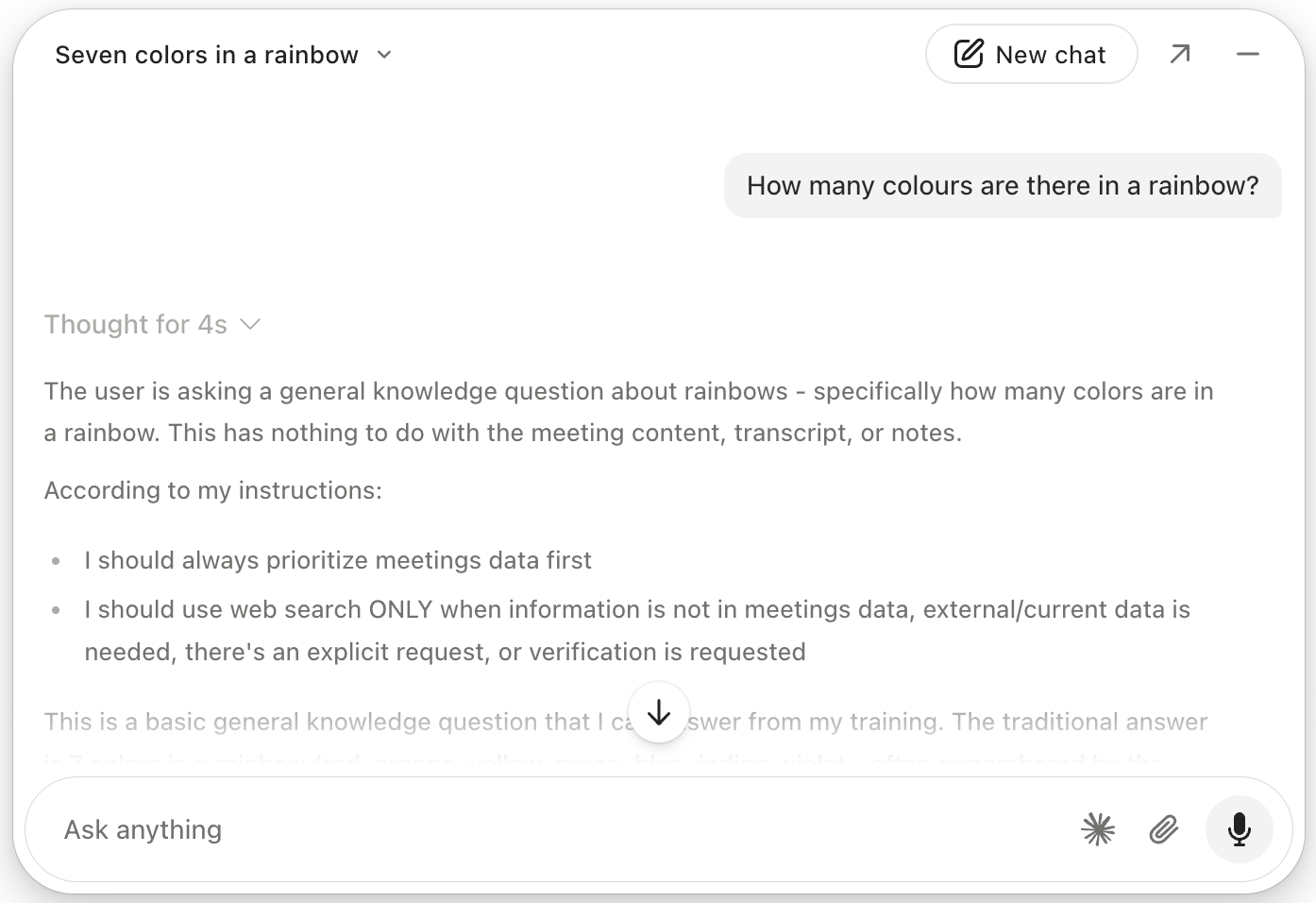
When to use thinking models
Use thinking models when:- You’re doing complex analysis or strategy work
- You’re exploring nuanced tradeoffs or scenarios
- You want to see the AI’s reasoning process, not just the final answer
- You’re working on high-stakes or intricate problems where transparency matters
Fable 5
Fable 5 is a thinking model available to Business workspaces. On Enterprise, Fable 5 is turned off by default. A workspace admin can enable it under Settings > Workspace > Data security > Claude Fable 5. Until it is enabled, Fable 5 appears disabled in the model picker. When Fable 5 is used, Anthropic retains agent input-output logs for 30 days for trust and safety purposes. Chat conversations with Fable 5 are not subject to zero data retention (ZDR). Learn more about Anthropic’s retention practices.Usage tips and best practices
This section covers general guidance for choosing the right model in chat.General recommendations
In most cases, you don’t need to pick a model manually:- Leave model selection on Auto unless you have a specific reason to choose a particular model
- On Basic, Auto is the only available option
-
Use standard models for:
- Quick questions
- Action item extraction
- Simple summaries or straightforward tasks
-
Use thinking models for:
- Complex analysis or strategy questions
- Situations where you care about how the AI reasoned through the answer
Example use cases
Some common ways to use each model type:-
Standard models
- Summarize a single meeting
- Pull out decisions and next steps
- Draft a short follow-up message based on a call
- Answer “what did we say about X?” for a specific meeting
-
Thinking models
- Compare multiple meetings to derive themes or recommendations
- Plan strategy based on several stakeholder conversations
- Analyze risks, tradeoffs, or options using detailed reasoning
- Understand why a particular recommendation is being made
Troubleshooting and common questions
This section addresses common issues and what to try.I’m not sure which model to pick
I’m not sure which model to pick
- Keep the setting on Auto so Granola selects the best model for your context
- Manually switch to a thinking model only when you know you need deeper reasoning or visible step-by-step thinking
I can only use Auto
I can only use Auto
- Basic workspaces use Auto only
- Upgrade the workspace to Business or Enterprise from Settings > Billing to manually select standard or thinking models
Fable 5 is disabled
Fable 5 is disabled
- On Enterprise, ask a workspace admin to enable Claude Fable 5 under Settings > Workspace > Data security
- On Basic, upgrade to a paid plan from Settings > Billing to manually select models