

Documentation Index
Fetch the complete documentation index at: https://docs.granola.ai/llms.txt
Use this file to discover all available pages before exploring further.
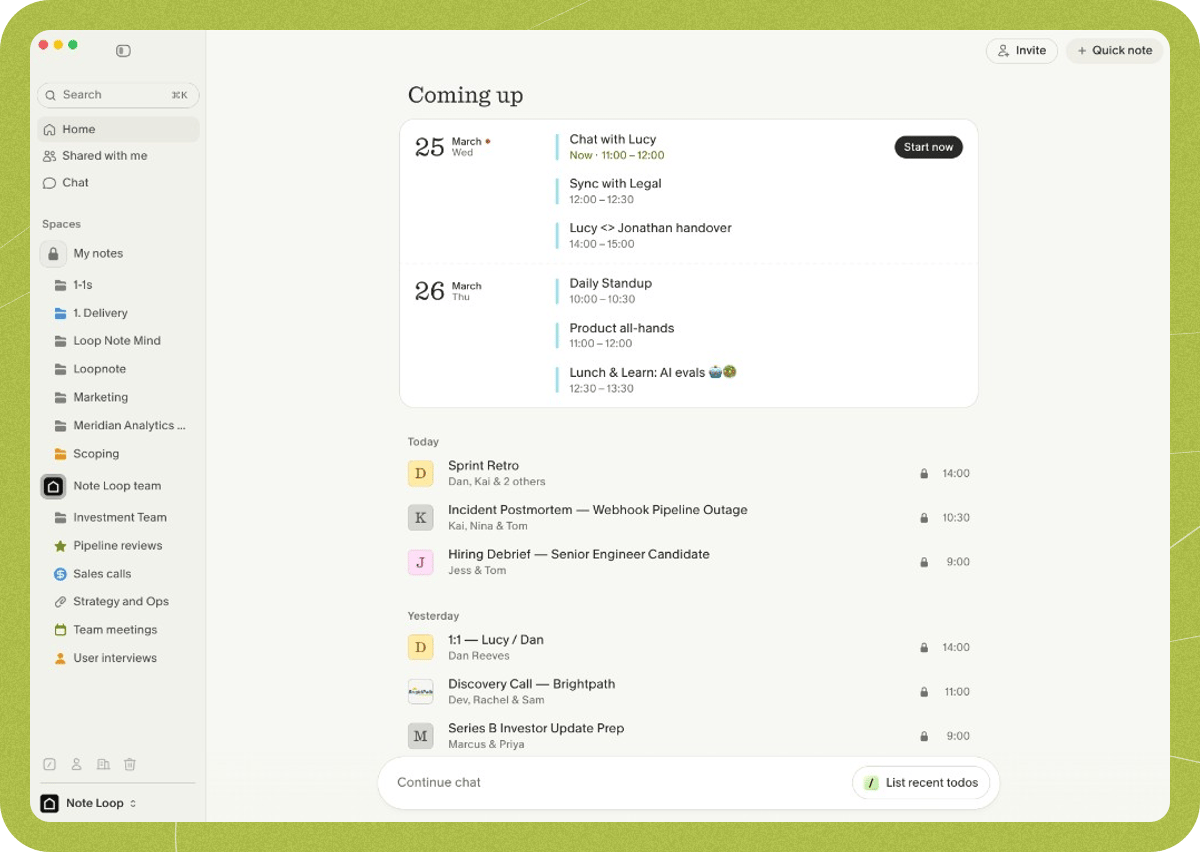
Welcome to Granola! Here’s what you’ll see when opening the app:
1. Coming up
Granola connects to your calendar to show your upcoming meetings. Clicking on one of these meetings will create a note for that meeting - you can do this in advance to jot down some pre-meeting thoughts, or when the meeting has started to start transcribing immediately.
2. Your notes
Once you’ve created a note, either from a calendar event or an ad-hoc note, it’ll appear here. You can add notes to folders, or select multiple notes to chat about in Granola Chat.
3. Spaces and folders
Your sidebar is organized into two spaces — My notes (private) and your team space (visible to your workspace). Within each space, you can create folders to organize your notes, share them with teammates, and get AI insights from specific sets of meetings.
4. Granola Chat
Chat with your meeting notes to recall meeting details, spot patterns across customer calls, and generate follow-up outputs.
5. Settings
Customize how Granola works - complete your profile to give Granola context when generating your meeting notes or create templates to get notes in a defined structured format. Pick the language you use in your meetings, set up one of our integrations like Zapier, and manage your subscription or add teammates to your Granola workspace.