

This doc walks through how we use various AI models and approach training those models at Granola.

How does Granola handle model training?

By default, Granola may use anonymized data to improve our services. This data is never sent to third parties — we have enterprise agreements with all of our service providers that prevent your data from being used in their model training. You can opt out of model training at any time.

How to opt out of model training

  1. In the Granola desktop app, open Settings > Preferences.
  2. Find the Use my data to improve models for everyone setting.
  3. Turn the toggle off.
Once the toggle is off, your data is no longer used to improve Granola’s models. The setting applies to your whole account, so you only need to change it once. The toggle isn’t available in the Android app yet — change it from desktop or iOS and it will apply everywhere. Enterprise workspaces: Enterprise customers are opted out by default, and admins can enforce the setting across the entire organization. On Enterprise plans, the toggle is labeled Use my workspace data to improve models for everyone and is managed by your workspace admin — email sales@granola.so to change it.

Which AI models does Granola use?

Summary notes Granola uses a combination of models for different aspects of the service. We continuously evaluate and switch between models to provide the best experience for different meeting types and use cases.

Granola Chat

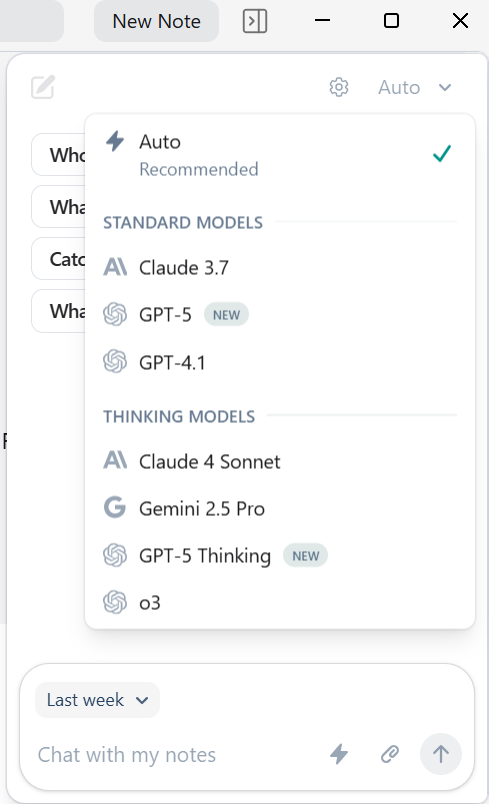
When using Granola Chat to chat with your meetings for insights, you can specify the model you’d like to use. image.png
Can I use my own AI models with Granola?

Currently, Granola uses our carefully selected models for transcription and summarization. We don’t support bringing your own models at this time, though we’re evaluating this for future enterprise features.