> ## Documentation Index
> Fetch the complete documentation index at: https://docs.granola.ai/llms.txt
> Use this file to discover all available pages before exploring further.
# Import notes from another account
> Import your meeting notes from another Granola account or email address into your current account. Keep your notes when switching accounts.
# What is note import?
Importing notes moves **all** your meeting notes and their transcripts from one Granola account into another. This includes notes older than 30 days, even if they aren't visible in the app due to the free plan's 30-day limit. You do not need to upgrade the old account before importing. This feature is for importing between two accounts that use **different email addresses** — for example, switching to a new email address, moving from a personal account to a work account (or the other way around), or consolidating two accounts into one. A verification code is sent to the old account's email address, so both accounts must have different emails.
This only works between two **Granola accounts**. You can't use it to import notes from other apps or platforms (such as Notion, Apple Notes, or Google Docs) — both the source and the destination must be Granola accounts.
If you have multiple workspaces under the **same** email address (for example, a personal workspace and an organization workspace), this feature is not the right one — use [Transfer notes between workspaces](/help-center/transfer-notes-between-workspaces) instead.
**You must be logged into the account you want to import the notes into** and have access to the **old account's email** to receive the verification code. Notes are **moved** (not copied): the old account will have no notes left after the import.
# How to import notes
Note import is only available on the Granola desktop app (macOS and Windows). You cannot import notes from the iPhone app.
Follow these steps to import your notes from an old account into your current one:
1. Log into the **Granola account you want to import notes into**
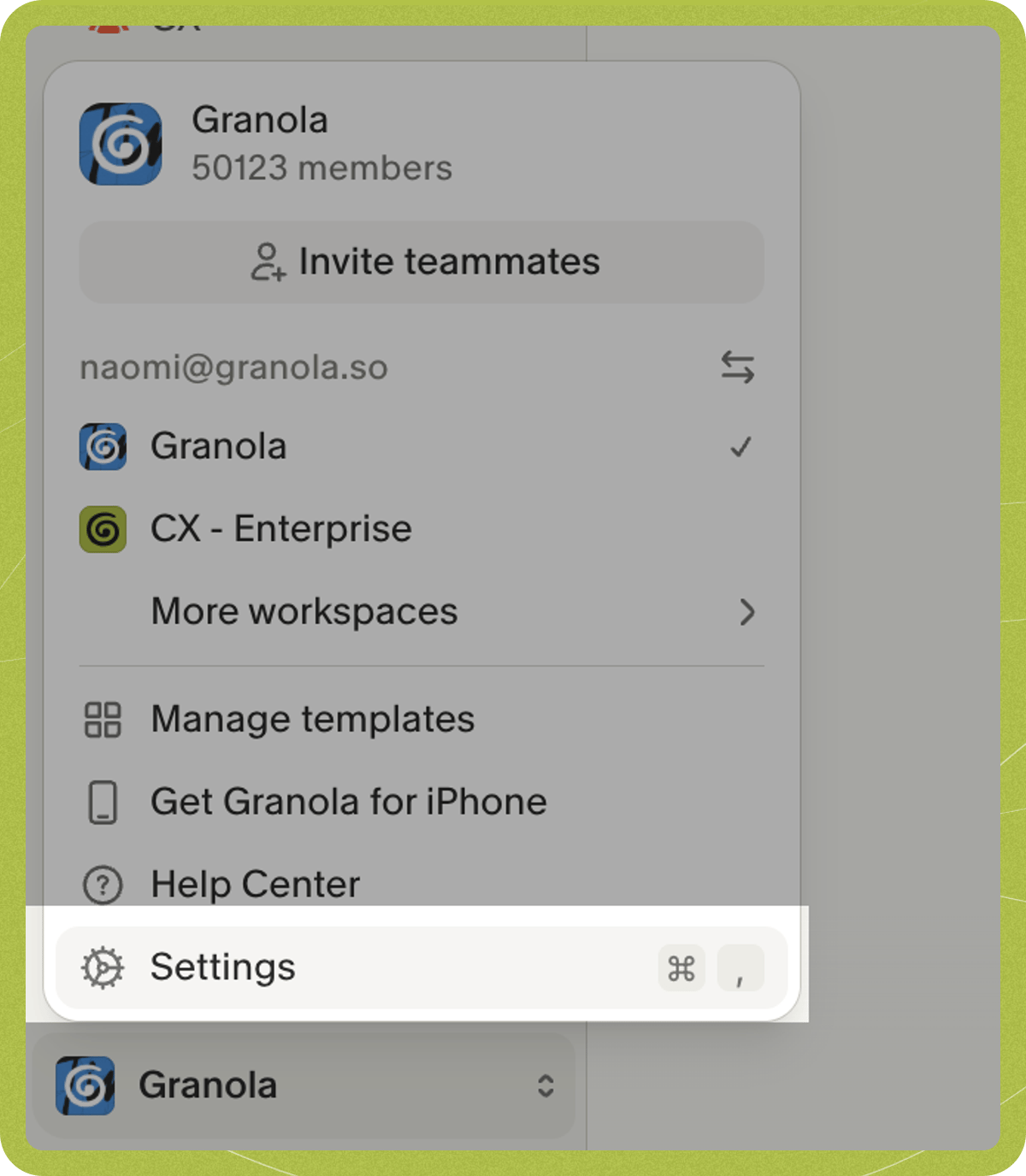
2. Click on your workspace name in the bottom left corner of the app
3. Click **Settings**
 4. Click on **Profile** in the settings menu
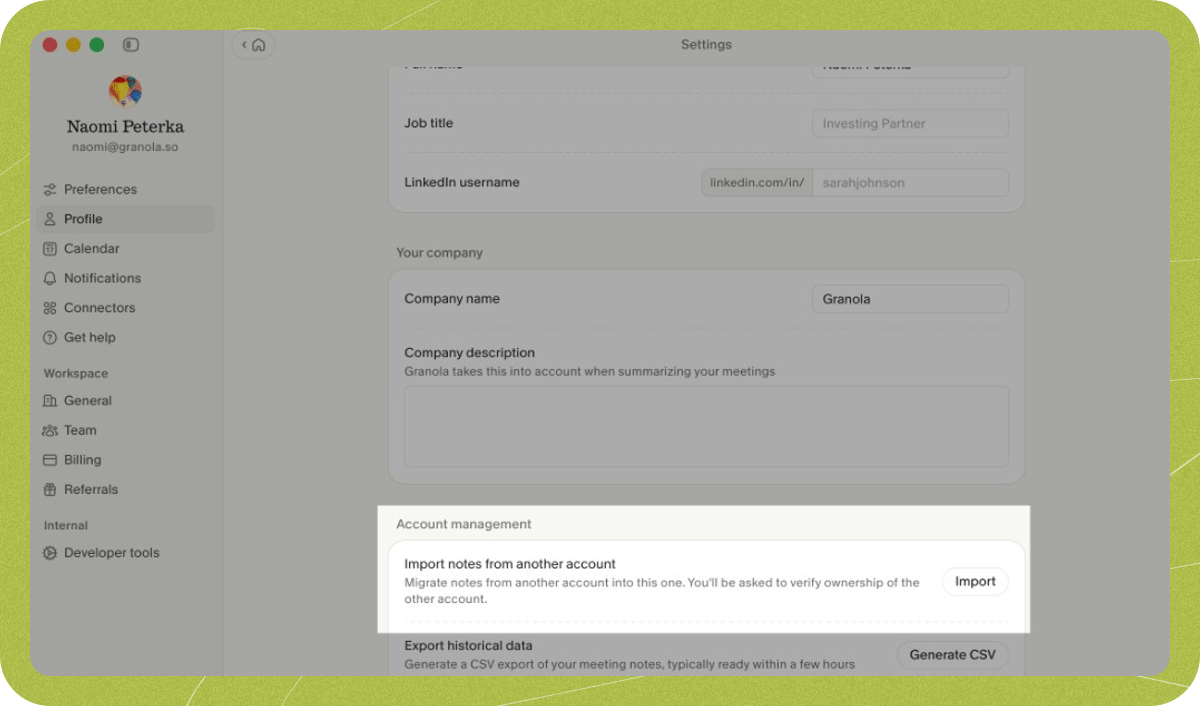
5. Scroll down to the **Account management** section and find "Import notes from another account", then click **Import**
4. Click on **Profile** in the settings menu
5. Scroll down to the **Account management** section and find "Import notes from another account", then click **Import**
 6. Enter your old account's email address
7. Check your old email inbox for a verification code. The code expires 10 minutes after being sent.
8. Enter the verification code to confirm you own the old account
Once verified, your notes will automatically import into your account. Your notes will be moved (not copied), so your old account will no longer contain any notes.
There is a 1-hour cooldown between import requests. If you need to try again, wait at least 1 hour before submitting a new request.
# Important limitations
Before importing your notes, be aware of what doesn't come with them.
**Subscriptions** - Your subscription plan stays with your old account. You'll need to set up a new subscription in your new account to continue accessing premium features like transcriptions.
**Shared folders** - Folders where you are the only member are imported with your notes. Folders shared with other people are not imported — you'll need to rejoin or recreate those in your new account.
# Troubleshooting
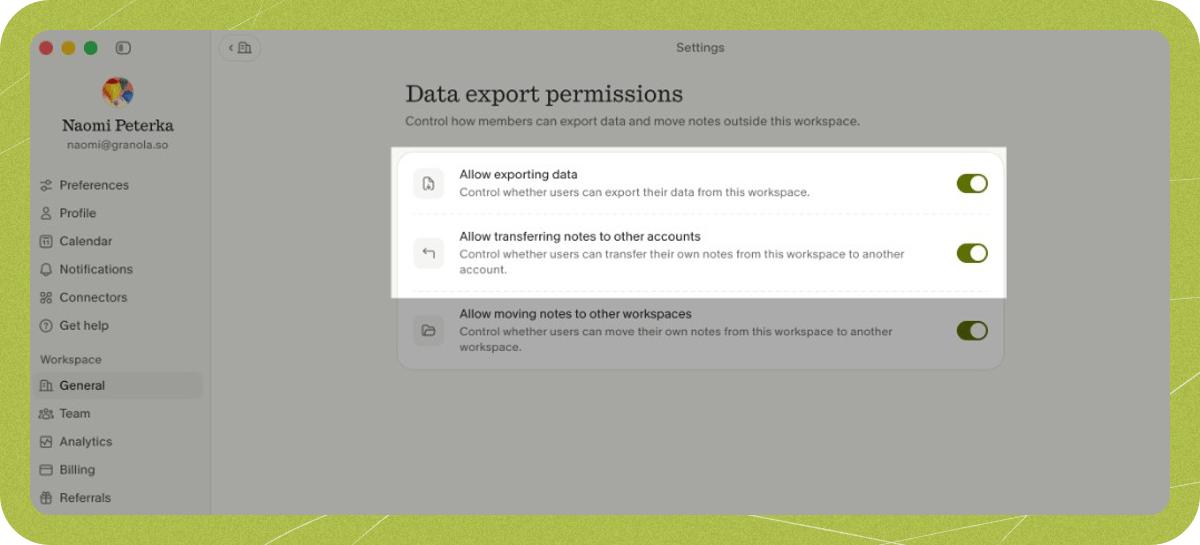
If you're on a Business or Enterprise workspace plan, one or both of the data export settings that control this feature may be off by default — or your workspace admin may have disabled them. You'll find both settings at **Settings > Workspace > General > Data export permissions**:
1. **Allow moving notes to other workspaces** — this is the prerequisite setting and must be enabled first.
2. **Allow transferring notes to other accounts** — this setting is unavailable until "Allow moving notes to other workspaces" is enabled.
If you're the workspace admin, you can enable both settings yourself. If someone else manages your workspace, ask them to turn both on.
6. Enter your old account's email address
7. Check your old email inbox for a verification code. The code expires 10 minutes after being sent.
8. Enter the verification code to confirm you own the old account
Once verified, your notes will automatically import into your account. Your notes will be moved (not copied), so your old account will no longer contain any notes.
There is a 1-hour cooldown between import requests. If you need to try again, wait at least 1 hour before submitting a new request.
# Important limitations
Before importing your notes, be aware of what doesn't come with them.
**Subscriptions** - Your subscription plan stays with your old account. You'll need to set up a new subscription in your new account to continue accessing premium features like transcriptions.
**Shared folders** - Folders where you are the only member are imported with your notes. Folders shared with other people are not imported — you'll need to rejoin or recreate those in your new account.
# Troubleshooting
If you're on a Business or Enterprise workspace plan, one or both of the data export settings that control this feature may be off by default — or your workspace admin may have disabled them. You'll find both settings at **Settings > Workspace > General > Data export permissions**:
1. **Allow moving notes to other workspaces** — this is the prerequisite setting and must be enabled first.
2. **Allow transferring notes to other accounts** — this setting is unavailable until "Allow moving notes to other workspaces" is enabled.
If you're the workspace admin, you can enable both settings yourself. If someone else manages your workspace, ask them to turn both on.
 If you're not seeing the verification email in your inbox, check your email's Updates, Promotions, and spam folders. Some email providers may also quarantine the message — check any quarantine or junk folder your provider offers. If you've made multiple attempts, remember to wait at least 1 hour between requests before trying again.
You must be logged in with the account you want to import into to start the import. If you haven't created a Granola account with that email address, you'll need to sign out, and then log into the new email to create a new account for it. You can then start the import from there. Note changing or creating workspaces is a separate action and this functionality must be done between accounts (i.e. between different email addresses).
You must have access to your old email address to verify ownership and complete the import. For privacy and security reasons, there's no alternative verification method available.
If you're not seeing the verification email in your inbox, check your email's Updates, Promotions, and spam folders. Some email providers may also quarantine the message — check any quarantine or junk folder your provider offers. If you've made multiple attempts, remember to wait at least 1 hour between requests before trying again.
You must be logged in with the account you want to import into to start the import. If you haven't created a Granola account with that email address, you'll need to sign out, and then log into the new email to create a new account for it. You can then start the import from there. Note changing or creating workspaces is a separate action and this functionality must be done between accounts (i.e. between different email addresses).
You must have access to your old email address to verify ownership and complete the import. For privacy and security reasons, there's no alternative verification method available.